
What We Learned Building an On-Device Voice Agent
We built an iOS travel assistant you can talk to with no internet connection at all. The speech recognition, language model, and voice all run on the phone, and it can hand the thinking off to a cloud model as soon as a connection is available.
Follow us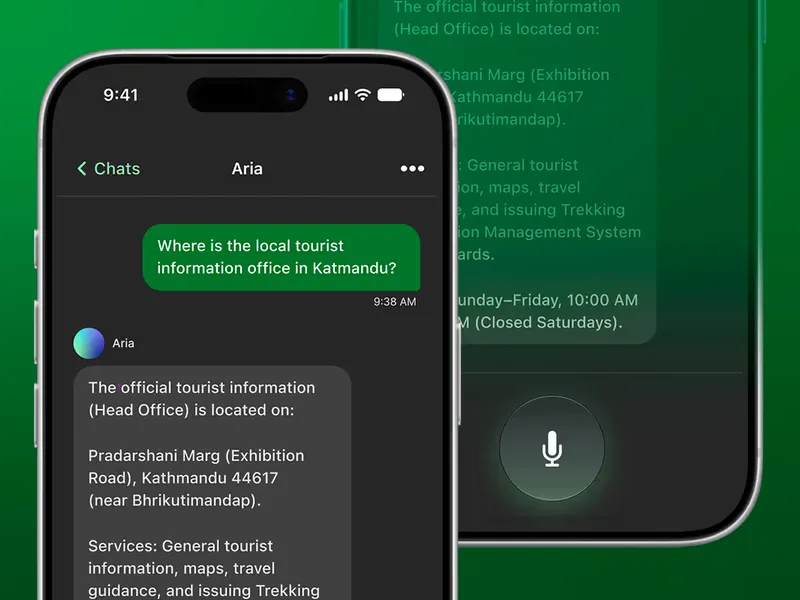
The code is open source: hybrid-voice-agent-sample.
What we built
You talk to the app, and it answers out loud. It's a React Native app built on the Switchboard SDK, and three things run on the phone: speech to text (Whisper), a small language model (Llama 3.2 1B), and text to speech (Sherpa). The small model is enough to hold a conversation but not enough to answer a hard question well, so you can also switch the brain, the part that thinks, as opposed to the parts that hear and speak, to a cloud model, even in the middle of a conversation.
Speech to text and text to speech always stay on the phone, so only the thinking moves. Both brains read and write the same transcript, which is why you can switch while you talk and the conversation continues instead of starting again. On an iPhone 13, a reply from the model on the phone comes back in about 2.6 seconds.

One thing is worth saying first, and it is the boring lesson: almost every real bug in this post came from using the app on a real iPhone, and very few came from the test suite. The tests were useful, but they never found the interesting problems.
Lesson 1: a small model will not follow your rules
This was the longest fight of the project, and it took four attempts.
The on-device prompt had a rule: refuse anything that is not travel help. Then we got this feedback from a reviewer:
"It kept saying 'I can only help with travel' no matter what I said to it."
First attempt. We made the rule narrower, so it would catch fewer things, but this did not help at all.
Second attempt. We looked at why, and found that the rule asked the model to answer with one fixed sentence, word for word. Every time it did this, that sentence went into the model's own context, and for a 1B model the most likely next answer is the sentence it just wrote twice. So after two refusals, "Where should I go in Norway?" also came back as "I can only help with travel", and the conversation never recovered.
Other questions in the same session were still answered correctly, so the rules were not broken — the repetition was simply stronger than them.
We fixed this in two ways: the refusal is now said in four different ways, so the user never hears the same sentence twice, and a refused exchange is removed from the history we replay, so the model never reads its own refusal again.
Third attempt, and the real lesson. We looked at the rule again and found it was wrong in both directions:
"Where is the local tourist information office in Katmandu?"
  -> I can only help with travel, and I'm not in a position to provide
     information on specific locations.

"Which is cheapest?"   (comparing Norway and Sweden)
  -> I can only help with travel.

"Write me a poem."
  -> twenty lines of verse
The first refusal came one turn after the model had recommended a tourist information office, while the one request the rule existed for went through without any problem, twice in one day.
So we deleted the rule and moved the decision into code, where it looks at the answer instead of the question. If the reply is a poem, we refuse, and a poem is easy to detect, because it has several lines with one sentence continuing past the end of the first. Normal text and lists never look like that.
The lesson: a rule has to guess what a request is before it sees the answer, while code can look at what actually came back. On a 1B model a request from the user is stronger than a rule in the system prompt, so you cannot win this fight in the prompt — move the decision to where you have more information.
Lesson 2: we looked for the bug in the wrong place
The replies often did not match the question, and then we found why: the first word of every sentence was disappearing.
"How much is a taxi to the harbour?"  ->  "much is attached to the harbor"
"Write me a poem."                    ->  "me a poem."
The obvious answer was that the audio buffer was too small, or that we needed a pre-roll, but that answer was wrong, because the audio was always there.
The real reason was this. The voice detector ended the utterance after the first word, because there was a very short pause after it. That short segment then started its own transcription call, and the call found nothing useful, so it returned an empty string, but it still consumed the audio. So the word was not lost in the buffer; it was eaten by a call that should never have happened.
No buffer setting could fix this, so instead we changed who is allowed to start a transcription. We removed one connection in the SDK's audio graph, so the voice detector no longer kicks off a transcription of its own, and moved that call up into the app's TypeScript layer. Now we wait 350 ms before transcribing, and if the person starts speaking again we cancel the call, so nothing is transcribed until the sentence is really finished.
The lesson: when audio goes missing, also ask who is allowed to make the call, not only how big the buffer is.
Lesson 3: we made people wait for words nobody would hear
The prompt says: answer in one or two short sentences. When the question was broad, the model ignored this and wrote a list instead:
[LLM] reply in 9314ms: Norway is a vast and diverse country... Here are some key things to know:
* Weather: ...
* Language: ...
* Culture: ...
* Accommodation: Norway has a wide range        <- cut off at 200 tokens
Our code already trims the reply down to its first sentence before handing it to the speaker, because the speaker reads out every line it is given. So the user waited 9.3 seconds and then heard one sentence that was ready after about one second, while everything else was generated and thrown away.
The fix was one number: we lowered the token limit from 200 to 80. The output did not change at all — the model simply stops writing text that nobody would hear.
After the change, measured on an iPhone 13 over 25 turns, the median was 2.6 seconds. The same question that took 9.3 seconds came back in 3.5 seconds at turn 2 and 3.8 seconds at turn 22, so there was no slowdown as the conversation got longer.
The lesson: a token limit is not only a cost setting, it is also a waiting time.
Lesson 4: one prompt cannot serve two models
The cloud brain kept telling people it was offline. This looked like a hallucination, but it was not: both brains got exactly the same prompt, and rule 2 started with "You are offline and cannot look anything up." We had told it to say that.
We split the prompt into two, and then a second problem appeared, because the cloud brain had also inherited the careful tone we wrote for the small model. Someone asked for a daily budget for Iceland, and it answered "research accommodation, food and activity costs online for the most accurate figures." It knows that answer; it just did not want to say it.
The lesson: being careful is correct for a small model, because it does not know much, but the same words on a big model only make the answer less useful. Write the prompt for the model you are actually using.
Lesson 5: how to write rules for a small model
We had three rules about not inventing facts. Two of them said what to refuse and what to say instead, in one sentence, while the third only said "do not do this" — and that was the rule the model ignored, which we saw break twice on a real phone.
The general idea is that a small model acts on instructions and ignores descriptions, so a rule that only describes the situation ("you have no internet") does nothing, while a rule that says what to do ("say you cannot check it, and say who can") works much better.
One warning, because this part surprised us: we added an example answer to the rule, and when we tested it, the model replied with the example word for word, as the answer to the example's own question. That only proves the example can be reached, not that the rule works in general, so test with a different question than the one in your example.
Lesson 6: the offline bug was not in our code
Working without a connection is the entire point of this app, so this was the bug that mattered most: in airplane mode, the cloud brain stayed available and the app never told the user the connection was gone. Our router and our UI were both correct, and the connectivity value simply never became false.
The reason was in the library. expo-network keeps one network monitor, which it starts when the first listener attaches and cancels when the last listener leaves. On iOS a cancelled monitor cannot be started again, and the call to start it fails quietly, so any subscription owned by a React component stops working the first time that component remounts — and in development that happens immediately.
[net] subscribing
[net] change: {"type":"WIFI","isConnected":true} -> on
[net] unsubscribing
[net] subscribing
[net] poll: ...                 <- and never a change line again
We moved the subscription out of React, so it now lives in the module, opens once and never closes, and React reads it with useSyncExternalStore.
There was a second, funnier problem in the same task: you cannot read the log with Wi-Fi off. The phone sends its console output to the development server over Wi-Fi, so when you turn Wi-Fi off to test offline behaviour, you also cut the log. The line [net] offline is written on the phone and never arrives, which cost us an extra round of testing. In the end we just watched the screen.
Lesson 7: the app was four times bigger than it needed to be
Left alone, the release build would have been about 1.63 GB, and the models were almost all of it.
CocoaPods copies the whole framework into the app, even the parts you never use. The speech framework ships a complete second speech-to-text system, which we do not use because we transcribe with Whisper, and that was 361 MB for one decoder graph plus 27 MB for a model. There was also a German voice we never select, at 83 MB.
Two changes fixed it. We moved the 773 MB language model out of the app and download it at first launch instead, which brought the build down to 856 MB. Then we started deleting the unused speech files right after we download and extract the frameworks, which took it to 384 MB.
The lesson: check what your dependencies actually put in the app bundle, because it is often not what you assume.
Lesson 8: we deleted a feature that worked
We built a small router that sent questions like "how much" and "how far" to the cloud, even when the user had chosen the on-device brain. It worked well, and the answers got better.
We removed it before we pushed it, because this app exists to show that a whole conversation can run on the phone, with the cloud as a choice the user makes rather than something that happens behind their back. An app that quietly sends the interesting questions to a server damages that message more than a wrong walking time does.
The lesson: "it works" is not the same as "it belongs in this product."
Lesson 9: write down what does not work
The small model invents facts, and it sounds confident when it does. It has put a Norwegian city in the wrong island group and it gives flight times to the minute, and once it started a reply with "You're in the airport, and you're due to fly to Kathmandu", when the user had only said hello.
We tried rewriting the rules and we tried temperature 0, but neither was enough. A code check could catch invented numbers, but not invented places — if we refuse every place the user did not name first, the app cannot answer the questions people really ask.
Speech recognition has a similar limit. The base English Whisper model is weak with names, and names are exactly what a travel app hears most, so "Budapest" comes back as "Buddha Pasht" often enough to plan for. Nothing after that step questions a wrong name, so one mistake becomes the base for the rest of the conversation.
We wrote all of this into the README, because the replies sound fluent and confident, and that is exactly why people need the warning.
One more note about writing it down. Our first version of that section was really a report about one afternoon with one phone: it named the device, quoted that session, and said what we had already tried. We rewrote it later as behaviour — what the model does, and how often to expect it. We also removed a number, "about one utterance in six is wrong", because it was a real measurement, but from one speaker, in one room, with one accent, and that is not enough to give a general rate.
What we would do differently
- Use the phone earlier. Several changes were merged with the note "not verified on device yet", and most of them needed a follow-up, while the test suite never found any of the problems above.
- Judge the end of a turn, do not just time it. Today we wait 500 ms of silence and then another 350 ms, which is 850 ms of waiting, and it is also how long it takes to interrupt the agent. The better solution is a model that decides whether the sentence sounds finished, and the Switchboard SDK already has one, so this is wiring rather than new work.
- Size the history by what the model can use, not by what fits. We first replayed 40 messages, because that is what fits in a 4096-token context, but with 11 exchanges of history the model answered a question from six turns earlier. Ten messages works much better, so the context window was not the real limit.
- Give the small model something to look things up in. Almost every quality problem comes from a 1B model with no retrieval, and the prompt cannot fix that.
The pull requests are public and each one explains the reasoning: hybrid-voice-agent-sample/pulls. The most interesting ones are:
#19 — the missing first word),
#20 — the repeating refusal),
#22 — the 9-second wait
#23 — deciding from the answer instead of the question.